How API Spector mocks speed up development
 Roy de Kleijn · · 9 min read
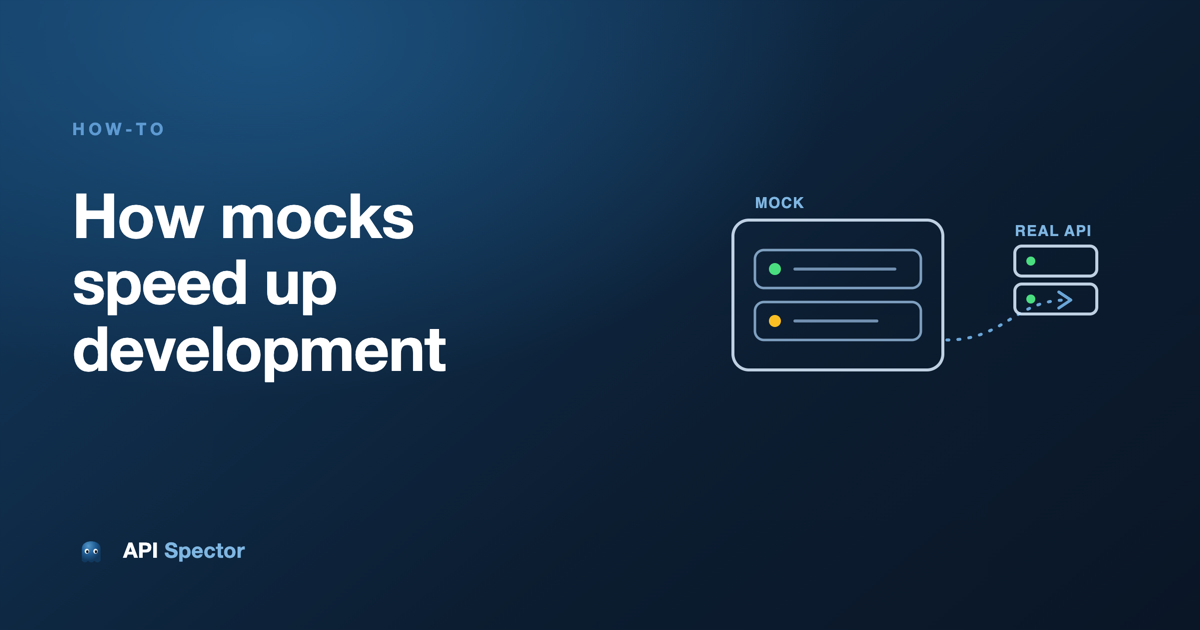
Mocks are usually sold as a way to keep working when the backend is down. That undersells them. A good mock server is a dial you turn on the API your app depends on: return the happy response, return a broken one, slow it down, reshape the data, or make it answer differently on the second call than the first. In API Spector a mock is part of your workspace, runs on your machine, and can forward anything you did not mock to the real server, so you can override exactly one endpoint and leave the rest alone.
This post wires a mock into the Practice Software Testing toolshop, a real Angular and Laravel app, and walks five behaviors you will actually use: a happy response, passthrough to the real API, fault injection, tweaked data, and stateful scenarios. Every step has a copy-paste example.
The setup
Practice Software Testing serves its UI at http://localhost:4200 and its API at http://localhost:8091. The Angular app keeps the API address in one file, sprint5/UI/src/environments/environment.ts:
export const environment = {
  production: false,
  apiUrl: 'http://localhost:8091',
  gaCode: ''
};
Every service reads environment.apiUrl. The product list, for example, is a GET to apiUrl + /products. So pointing the whole app at a mock is a one-line change, which we make at the end once the mock is built.
Build the mock
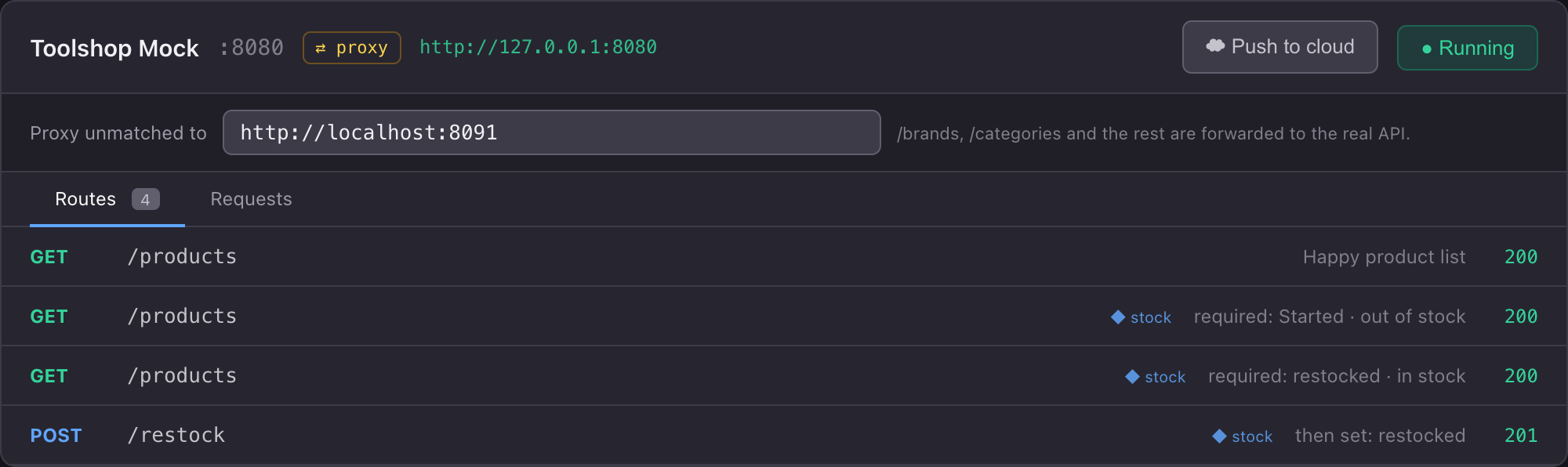
In API Spector, open the Mocks panel and create a mock named Toolshop Mock on port 8080. A route has a method, a path, a status, and a JSON body. We will add a few, start the mock, and point the shop at it.
1. The happy response
The shop's overview page reads a paginated list from GET /products. Add a route that returns two products in exactly that shape:
GET /products returns 200:
{
  "current_page": 1, "per_page": 9, "from": 1, "to": 2, "total": 2, "last_page": 1,
  "data": [
    {
      "id": "01MOCK-CHISEL",
      "name": "Mock Wood Chisel Set",
      "description": "Sharp enough to carve a demo.",
      "price": 14.5,
      "in_stock": true,
      "is_location_offer": false,
      "is_rental": false,
      "product_image": { "id": 1, "file_name": "chisels01.jpeg", "title": "Chisels" },
      "brand": { "id": "01BRAND", "name": "ToolCo", "slug": "toolco" },
      "category": { "id": "01CAT", "name": "Hand Tools", "slug": "hand-tools" }
    },
    {
      "id": "01MOCK-DOZER",
      "name": "Mock Mini Bulldozer",
      "description": "For when the backlog is a literal pile.",
      "price": 1999.0,
      "in_stock": true,
      "is_location_offer": true,
      "is_rental": true,
      "product_image": { "id": 2, "file_name": "bulldozer01.jpg", "title": "Bulldozer" },
      "brand": { "id": "01BRAND2", "name": "DigRight", "slug": "digright" },
      "category": { "id": "01CAT2", "name": "Power Tools", "slug": "power-tools" }
    }
  ]
}
Add one response header so the browser at :4200 accepts the cross-origin response:
Access-Control-Allow-Origin: *
Check it from the command line:
curl -s http://localhost:8080/products | jq '.data[].name'
"Mock Wood Chisel Set"
"Mock Mini Bulldozer"
Two products, no database, no backend. The file_name values (chisels01.jpeg, bulldozer01.jpg) match images the shop already ships, so the cards render with pictures.
2. Passthrough: mock one endpoint, proxy the rest
A shop page needs more than products: brands and categories for the filters, images, and more. You rarely want to mock all of them. Set the mock's Proxy unmatched to field (it lives per mock, in the header editor next to the name and port) to the real API:
http://localhost:8091
Now any request that matches no route is forwarded to the real server and its response relayed back. You mocked GET /products; everything else (/brands, /categories/tree, /images) comes from the real API untouched. The request log tags each row as served by the mock or proxied:
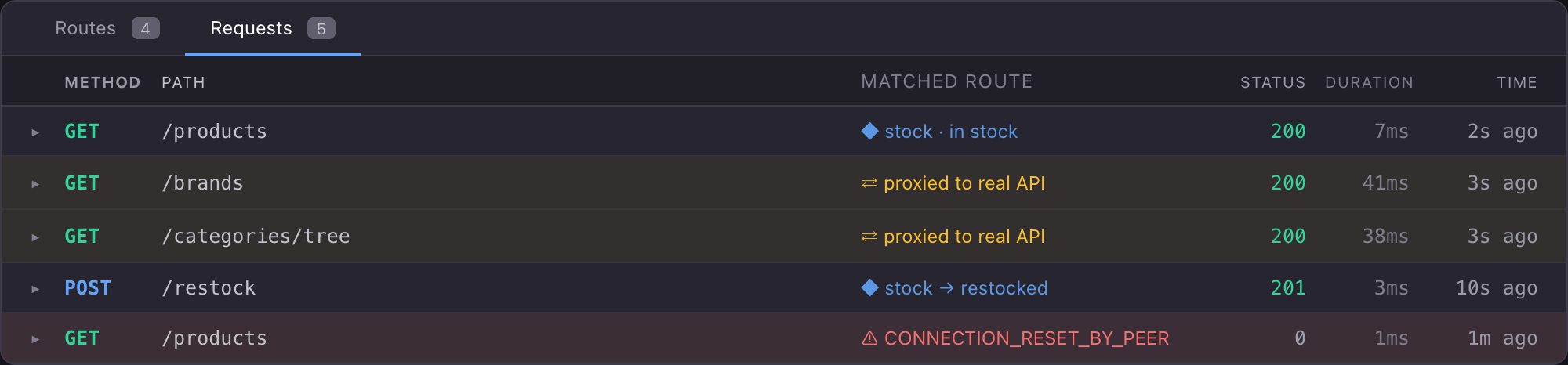
This is the setup you will reach for most: run the real backend, override the one endpoint you are working on, and leave the rest live. If you have no backend at all, skip the proxy and mock the handful of endpoints the page reads.
3. Fault responses
Real servers do not always answer with clean JSON. They hang up, reset the connection, or dribble out garbage, and your app has to survive all of it. That is painful to reproduce on purpose, until you can.
Open the GET /products route, pick a value from the Fault dropdown, and save. The fault replaces the normal response:
- EMPTY_RESPONSE: accept the connection, then close it with nothing.
- MALFORMED_RESPONSE_CHUNK: send a 200 status line, then garbage, then close.
- RANDOM_DATA_THEN_CLOSE: send garbage, no valid HTTP at all, then close.
- CONNECTION_RESET_BY_PEER: reset the socket, so the client sees "connection reset" rather than a clean end of file.
curl -sS http://localhost:8080/products
curl: (56) Recv failure: Connection reset by peer
Reload the shop with this set and you see exactly how the overview handles a dead API: the spinner that never stops, the error state, the retry, or the blank page you did not know you shipped. Faults compose with delay, so you can also make a route wait two seconds and then reset, to exercise client timeouts: set Delay ms to 2000 alongside the fault.
4. Tweaked data
The happy response is a fixed body, but you rarely want fixed. There are two ways to shape it.
Templates with faker. Any {{ ... }} token in a route body is evaluated with faker and dayjs before the response is sent, so one route returns fresh data on every call. Give each product in the mocked /products response a generated SKU:
{ "name": "Mock Wood Chisel Set", "price": 14.5, "in_stock": true, "sku": "{{faker.string.alphanumeric(10)}}" }
curl -s http://localhost:8080/products | jq '.data[].sku'
"7FK2P9ZQ1A"
"B3X8MWN4LC"
New values every call, so you can exercise the new-record or rare-ID paths without hunting for the right row in a database.
Scripts for logic. A pre-response script runs before the body is sent and can read the request and rewrite the response. Put everything on sale, and let a query parameter force everything out of stock, on the GET /products route:
const payload = JSON.parse(response.body);
payload.data.forEach(p => {
  p.discount_price = Number((p.price * 0.8).toFixed(2));
  p.in_stock = request.query.oos !== 'true';
});
response.body = JSON.stringify(payload);
curl -s 'http://localhost:8080/products?oos=true' | jq '.data[] | {name, in_stock, discount_price}'
Now you can test the discount badge and the out-of-stock label on demand, without touching a database or hunting for the right record.
5. Stateful behavior
The hardest things to test are the ones that change: a cart that fills, an order that moves through states, stock that runs out and comes back. A single fixed response cannot model that. A scenario can.
A scenario is a small state machine, one per mock. Each route can declare which state it needs (its required state) and which state to move to after it serves. Several routes can share one path and answer in turn as the state advances. The scenario starts in Started.
Model stock that is out, then restocked. Three routes, all in a scenario called stock:
| Method | Path | Scenario | Required state | Then set state | Body |
|---|---|---|---|---|---|
| GET | /products | stock | Started | (none) | products with in_stock: false |
| GET | /products | stock | restocked | (none) | products with in_stock: true |
| POST | /restock | stock | (any) | restocked | { "ok": true } |
Watch the same request change its answer:
# Out of stock
curl -s http://localhost:8080/products | jq '.data[].in_stock'
false
false

# The warehouse restocks
curl -s -X POST http://localhost:8080/restock
{ "ok": true }

# Same request, new answer
curl -s http://localhost:8080/products | jq '.data[].in_stock'
true
true
Reload the shop between those calls and the stock labels flip from out to in. To run the flow again, the Reset state button rewinds every scenario to Started (out of stock), with no restart.
Point the shop at the mock
The toolshop keeps its API address in one file, sprint5/UI/src/environments/environment.ts. Change the single line that points it at the backend so it points at your mock instead:
export const environment = {
  production: false,
  apiUrl: 'http://localhost:8080', // was http://localhost:8091
  gaCode: ''
};
Save; the Angular dev server reloads on its own. Open http://localhost:4200 and the toolshop is now driven by your mock: the two products you defined, with the sale price you scripted and the out-of-stock state from the scenario, and everything you did not mock (the brand and category filters, the images) proxied through to the real API.
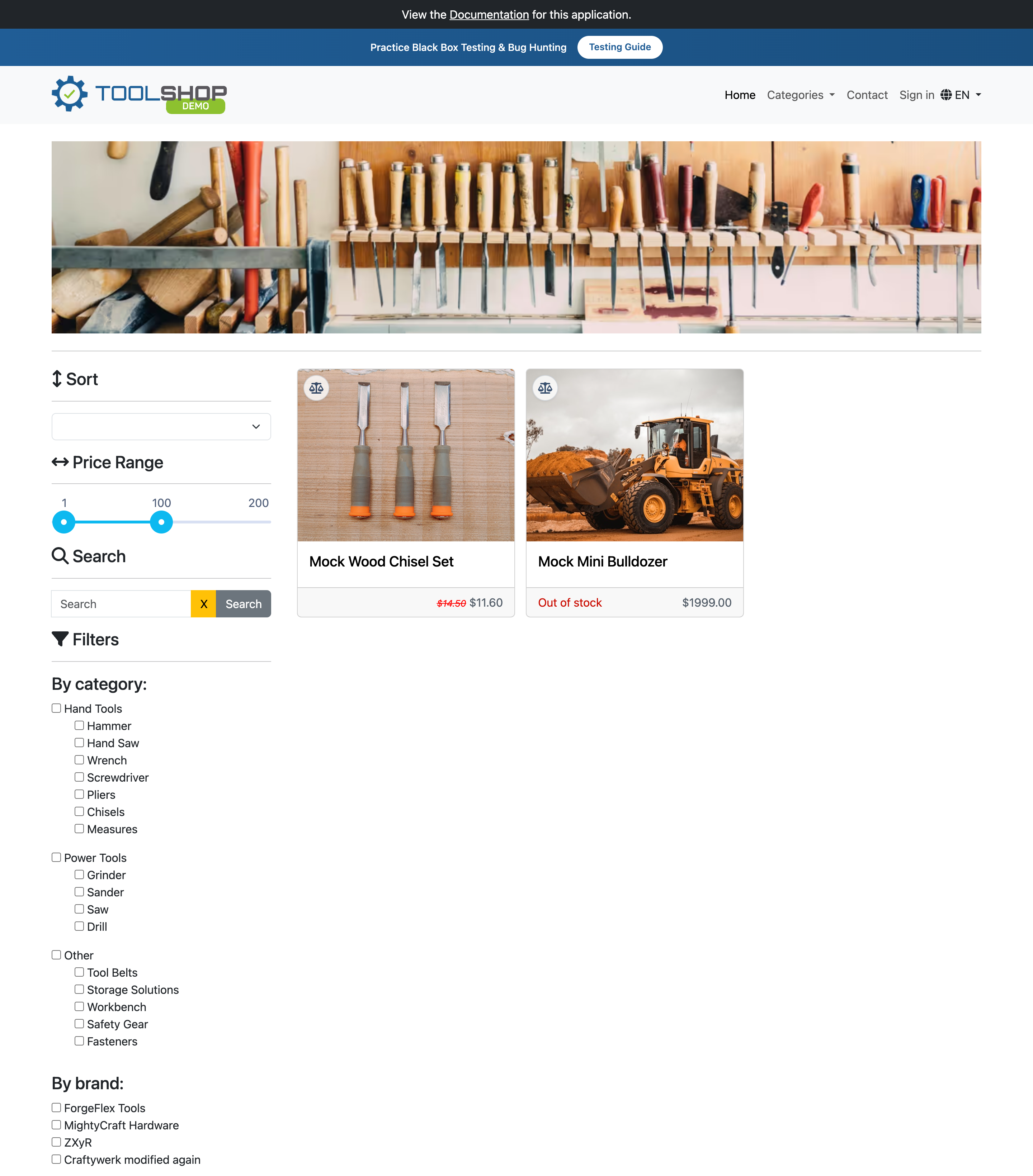
One note on CORS: your own mocked routes need Access-Control-Allow-Origin: * on the response, which we added in step 1. Responses that pass through to the real API already carry its CORS headers, so those need nothing.
Start it from the UI or the CLI
You started the mock from the UI with the Start button; it runs at http://127.0.0.1:8080 and shows a proxy badge when passthrough is set.

The same mock runs headless from the command line, which is what you want in CI or a dev container:
npx api-spector mock --workspace ./toolshop.spector --log
--log prints every incoming request and marks each one as served, proxied, or a fault, so you can watch the shop talk to the mock in real time. The mock is a file in your workspace, so the UI and the CLI run exactly the same routes, faults, and scenarios.
Why this speeds things up
Each behavior removes a wait. The happy response means the frontend does not wait for the backend to exist. Passthrough means you override one endpoint instead of standing up a whole fake API. Faults mean you reproduce the outage in a second instead of hoping to catch it in staging. Tweaked data means you hit the edge case on demand instead of hunting for the right record. Stateful scenarios mean you test the flow, not just the snapshot. The mock lives in the workspace next to your requests, runs the same from the UI and the CLI, and forwards whatever you did not mock to the real thing, so you reach for it early and keep it close.