How to import an OpenAPI spec in API Spector
 Roy de Kleijn · · 1 min read
If you have an OpenAPI spec, you do not have to build requests by hand. API Spector reads the spec and turns its operations into requests.
1. Open the import dialog
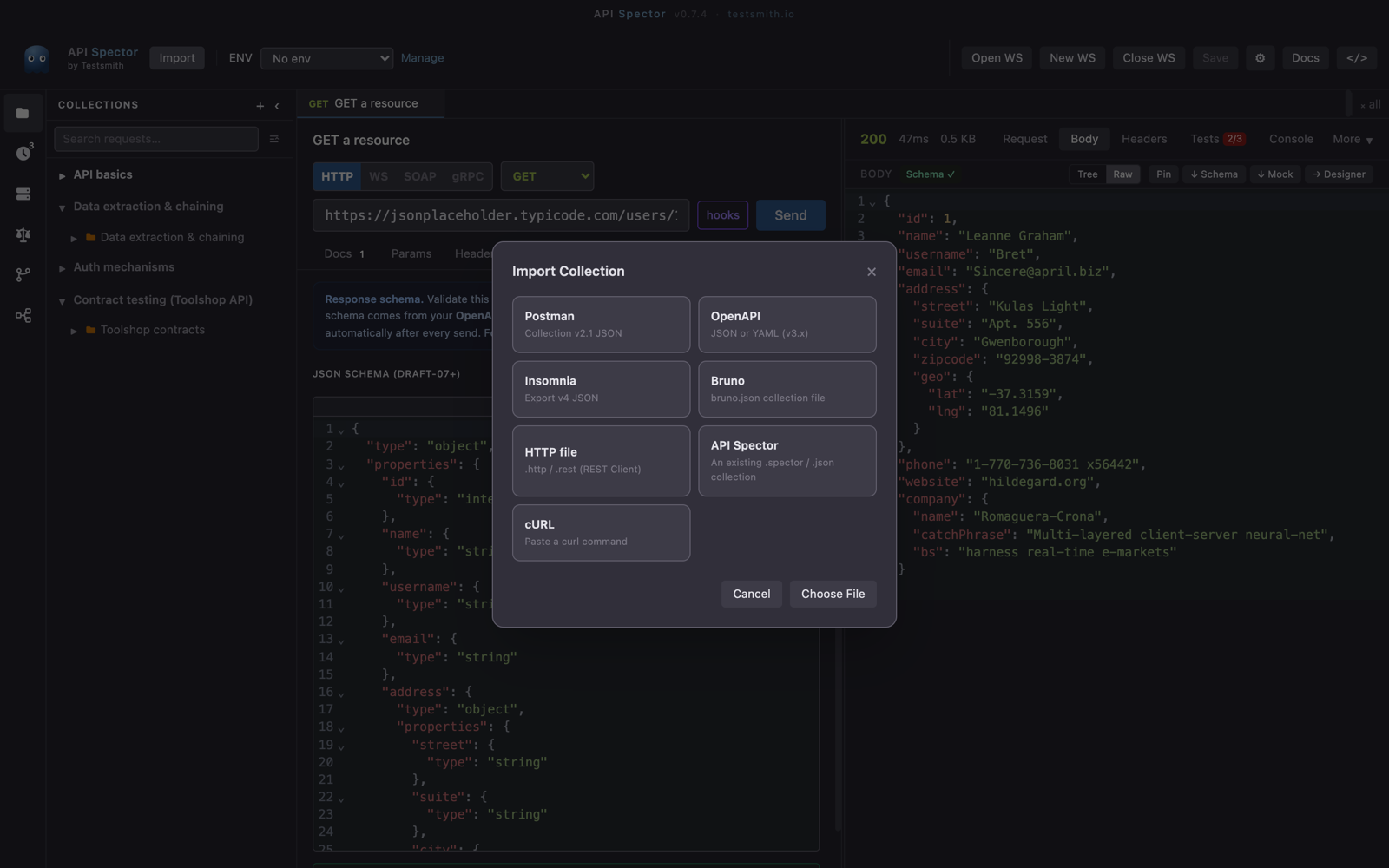
Click Import in the toolbar. The import dialog lists the formats it reads: Postman, OpenAPI, Insomnia, Bruno, HTTP file, and cURL. Choose OpenAPI (JSON or YAML, v3.x).
2. Point it at a file or a URL
Pick a local spec file, or paste a spec URL. OpenAPI is the one format you can import straight from a URL, which is handy when the spec is published next to the API.
3. Choose endpoints and a destination
API Spector previews the operations in the spec. Select the ones you want, pick or create a destination collection, and optionally extract the base URL into an environment variable, so every imported request uses {{baseUrl}} and you can repoint them all at once.
4. Import
Confirm, and the operations become requests in your collection, each with its method, path, parameters, and body, ready to send.